I recently conducted a git workshop at my college. Prepping for it pulled me into the rabbit hole of how git really works, here is the fun stuff I found.
What is Git?
Git is just an optimized file system that has a key-value data stored. The keys are some "hashes" and values are the "content". Thats all, git is that at the low level.
Before we go into how things work, let me explain a few terms.
1. Blobs
Blobs store the raw content of a file, it does not directly store the value in plain text, rather it uses zlib to compress the content. Every time you stage something new a new blob will be generated. The blobs are named after the SHA-1 hash (40-characters long) generated from its file's size and its contents.
In that case, a new blob won't be generated, this is done for memory optimization. If you have 10 files with same content in your project, git will only create one blob for it.
2. Trees
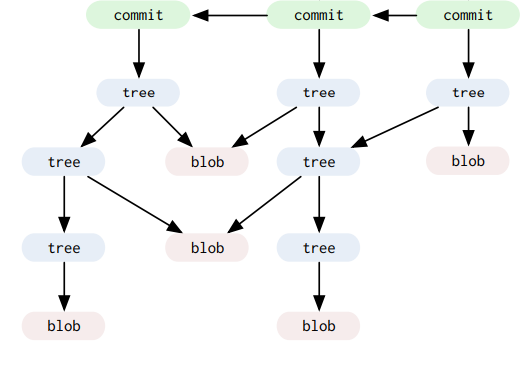
When you commit something using git commit -m <msg>, two new objects are created: Tree Object & Commit Object.
The Tree Object is what represents a directory, it points to the Blob using its hash, so it knows which file's content lives where.
Because a commit almost always involves more than one file, and it needs a way to represent the entire directory structure, not just a single file's content. If a commit pointed directly to blobs, it would need to store a flat list of every single blob hash for every file in the project, which does not scale and does not represent folders at all. Trees solve this by mirroring the file system: a tree can point to blobs (files) as well as other trees (subdirectories).
3. Commit Objects
When you commit something using git commit -m <msg>, a Commit Object gets created, and this Commit Object points to the hash of the Tree, so it knows exactly what content it represents.
Along with that hash, it also stores stuff like the commit message, the author, the timestamp, and the hash of the parent commit, this is what lets git build that whole commit history chain you see in git log.
This is the structure:
Now that I have explained the theory, lets look at this in action - it's ofc more fun that way.
Staging
I will use this command to look at the directory structure of the .git folder
watch -n 1 --color "tree -a -C .git"
When you run git init a .git folder is created with this structure:
I will create a file: touch hello.py
I will stage the file to git.
To stage a file we use: git add hello.py
Look what happens to our tree once the file is staged:
Earlier when I talked about blobs, the highlighted portion is what that is. When you stage a file, a blob is created if the file is unique. The blob is added to /objects directory.
The long number that you see is the SHA-1 hash of the change that I discussed earlier.
The entire hash is e69de29bb2d1d6434b8b29ae775ad8c2e48c5391
Git splits the first 2 characters of the hash into a directory name and uses the remaining 38 characters as the filename. This is done to avoid having thousands of files sitting in a single directory, which would be slow when you want to get a blob.
Also notice the index file that appeared, thats the staging area. When you run git add, git updates this file to keep track of whats staged and ready to be committed.
Committing
Now lets commit this: git commit -m "first commit"
Two new objects appeared!
Remember what I said about git commit creating two new objects? A Tree Object and a Commit Object, thats exactly whats happening here.
You can check the type of any git object using git cat-file -t <hash>, and you can see its content using git cat-file -p <hash>.
If you run git cat-file -t 8ee9 you will see it says tree, and if you run git cat-file -t b6e4 it will say commit.
Lets look at whats inside the commit object: `git cat-file -p b6e4`
tree 8ee9ba6a90927dedfb216824ca7c0dc33566bd86
author Pranjal Kumar <kpranjal219@gmail.com> 1790165201 +0530
committer Pranjal Kumar <kpranjal219@gmail.com> 1790165201 +0530

first commit
See that? The commit object is pointing to the tree's hash. It also has the author, committer and the commit message we wrote.
And if you look at the tree object using git cat-file -p 8ee9, you will see it pointing to the blob:
100644 blob e69de29bb2d1d6434b8b29ae775ad8c2e48c5391 hello.py
There it is, the full chain:
Commit -> Tree -> Blob. The commit knows the tree, the tree knows the blob, and the blob has the actual file content.
The 2nd commit
So far we made one commit and saw three objects get created: a blob, a tree and a commit. Now lets make a second commit and see what git actually reuses.
First I will create another empty file: touch world.py, stage it and commit it: git add world.py and git commit -m "second commit".
Here is what /objects looks like now:
Only two new objects showed up, not three. A new tree (782b) and a new commit (8842), but no new blob.
Why? Because world.py is empty, and we already have a blob for empty content from hello.py, that e69de29... one. Remember what I said earlier, git only makes a blob when the content is unique. Both files have the exact same content (nothing), so they both point to the same blob.
You can see this if you look at the new tree with git cat-file -p 782b:
100644 blob e69de29bb2d1d6434b8b29ae775ad8c2e48c5391	hello.py
100644 blob e69de29bb2d1d6434b8b29ae775ad8c2e48c5391	world.py
Two files, same blob hash. Thats the memory optimization in action.
Now lets edit the file
Lets put some actual content in world.py:
echo 'print("hello world")' > world.py
Then stage and commit it again: git add world.py and git commit -m "edit world.py".
Look at /objects now:
This time three new objects appeared, a new blob (8cde), a new tree (cab1) and a new commit (7696).
The blob is new because the content of world.py changed, its not empty anymore, so git has to store this new unique content. You can confirm the blob hash matches the file with git hash-object world.py, it gives you 8cde7829....
And the new tree now points to this new blob for world.py, while hello.py still points to the old empty blob:
100644 blob e69de29bb2d1d6434b8b29ae775ad8c2e48c5391	hello.py
100644 blob 8cde7829c178ede96040e03f17c416d15bdacd01	world.py
Here is the whole thing in one picture:
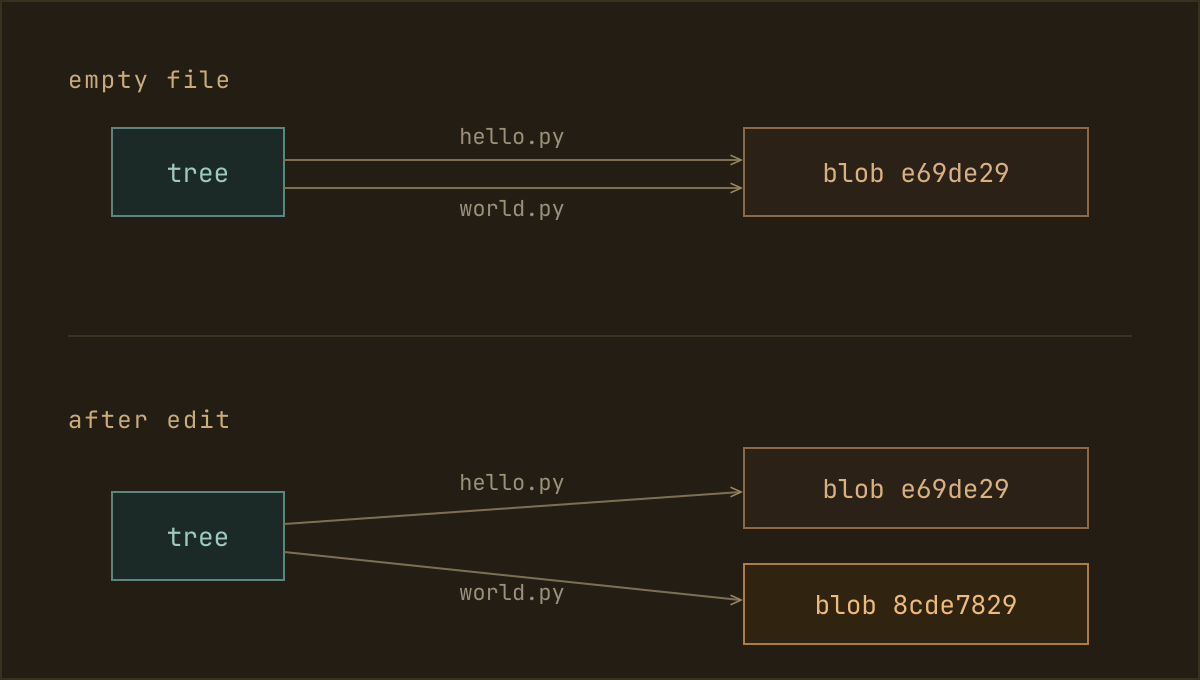
So to sum it up, a blob is only created when the content is new. A tree and a commit get created on every commit, because the directory snapshot and the commit history always change.
Reverting a commit
Say that edit was a mistake and I want world.py back to empty, like it was in the second commit. I will use git revert:
git revert HEAD
Remember a commit is nothing fancy, its just a snapshot of the directory (a tree) plus a parent and a message. So to undo the edit, git just builds the directory the way it was before that commit and saves it as a new commit on top. Thats all revert is.
And since the directory before the edit (both files empty) is the exact same state as the second commit, git doesnt build anything new, it just reuses the tree and blob it already has, and only writes the new commit.
Watch what objects get created after the revert:
Just one new object, the commit aade245. No new tree, no new blob, because the empty world.py already has its blob (e69de29) and that empty-directory tree already exists too.
You can see it if you open the revert commit:
git cat-file -p aade245
tree 782b6c6a9b51e34c81e4f67b2207a4b2b28cce69
parent 7696577206a5b8d3aba4737cf0708fb523775252
author Pranjal Kumar <kpranjal219@gmail.com> ...
committer Pranjal Kumar <kpranjal219@gmail.com> ...

Revert "edit world.py"
That tree 782b... is the second commit's tree, pointed at again. The parent is still the edit world.py commit, so nothing got deleted, the edit is right there in history. Git just made a new commit that points back at content it already had.
Thats the whole trick.
Branching
Branches feel like a big deal, like git is copying your whole project into a separate workspace. But under the hood a branch is the simplest thing in this entire blog, its just a tiny file with a commit hash in it.
Lets look. There is a folder .git/refs/heads/, and right now it has one file, main:
cat .git/refs/heads/main
aade245efcf234f2f87b929b9aa144a76321b283
Thats the whole branch. ONE file and ONE line, the hash of the commit the branch is pointing at. Thats why main always means "the latest commit on main", the file just holds that commit's hash.
And how does git know which branch you are currently on? Theres a file called .git/HEAD:
cat .git/HEAD
ref: refs/heads/main
So HEAD is just a pointer to a branch, and a branch is a pointer to a commit.
Making a branch
Now watch what happens when I make a new branch: git branch feature
cat .git/refs/heads/feature
aade245efcf234f2f87b929b9aa144a76321b283
Thats it. Git just created one new file feature with the current commit's hash in it. No new objects got created at all, the object count stayed exactly the same. Both branches are just pointing at the same commit right now.
Thats why making a branch in git is instant, it never copies your files, it just writes one hash into a new file.
Switching and committing
Lets switch to it: git switch feature. All this does is rewrite HEAD:
cat .git/HEAD
ref: refs/heads/feature
Now HEAD points to feature instead of main.
Now lets make a commit here (I add a feature.py file and commit it). Since HEAD points to feature, git moves the feature pointer forward to the new commit, and main stays exactly where it was:
The history split. main is still on aade2, feature moved ahead to the new commit, and because the new commit's parent is aade2, both branches still share all the old history behind them.
So branching isnt some heavy copy of your project. Its just a pointer to a pointer.
Merging
Now that feature has its own work, lets bring it back into main with git merge.
For a merge to be interesting, the two branches need to have gone their own way first. So lets say main also moved on, I switched to it and added a README.md. Now both branches have a commit the other doesnt, but they both grew out of the same aade2 commit:
* b1cda  add README.md       (main)
| * e67b  add feature.py      (feature)
|/
* aade2  Revert "edit world.py"
* ...
Now I merge: git switch main and then git merge feature.
Git looks at where the two branches split (aade2) and combines the changes from both sides into one new commit. The interesting bit is that commit, remember how a commit stores the hash of its parent? A merge commit is the exact same thing, it just has two parents, one for each branch it joined:
You can see it in the merge commit itself:
git cat-file -p HEAD
tree 7eaa0246d8a346a9302cc7893d848afa2221127e
parent b1cdaf81e98b7c6d1220394222efea53cfe58157
parent e67b9dcb3bfaa4b9c370e1deef04e07e7bfc18b1
author Pranjal Kumar <kpranjal219@gmail.com> ...
committer Pranjal Kumar <kpranjal219@gmail.com> ...

Merge branch 'feature'
Two parent lines, thats how a merge works. The merge also only created two new objects, the merge commit and one new tree holding both files, the blobs for README.md and feature.py already existed.
Thanks a lot for reading all the way through :)
Hope the .git folder feels less like a black box now, and more like files pointing at each other.
References
- Git from the Bottom Up
- Git Internals by John Britton of GitHub - CS50 Tech Talk
- The Biggest Misconception About Git
- How Git Internally Works
- How GIT works under the HOOD?
Note: the diagrams are LLM-generated, but every id and the structure are mine, from running it all